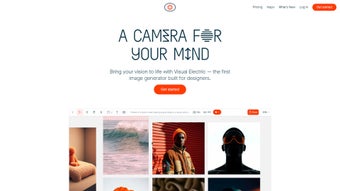

Download Visual Electric – AI Image Generator for Creatives, Free & Secure
Overview: Why Visual Electric Is Changing the AI‑Art Landscape
Visual Electric arrives at a moment when creative professionals are hungry for tools that combine the raw power of artificial intelligence with a user‑friendly, web‑based environment. Unlike many AI generators that lock users into a single aesthetic or require steep learning curves, Visual Electric offers an infinite canvas that lets you experiment without boundaries. By simply typing a prompt—whether you’re looking for a moody film‑still, a crisp photographic scene, or a whimsical twee illustration—the platform translates language into high‑resolution imagery in seconds.
The engine behind Visual Electric is trained on a diverse dataset that captures a wide range of visual languages. This breadth enables the tool to respond to nuanced mood descriptors such as “cinematic twilight” or “vintage twee,” producing results that feel both authentic and original. The real magic, however, lies in the suite of post‑generation controls: the Remix option lets you re‑color or shift the emotional tone of an image, while Touch Up provides pixel‑level refinement for those final polish moments. The Variations slider adds a layer of creative randomness, allowing you to dial the degree of novelty from subtle tweaks to radical reinterpretations.
Beyond the artistic side, Visual Electric is built with security and performance in mind. All processing happens on encrypted servers, ensuring that your prompts and generated assets remain private. The platform also receives regular updates that expand style libraries, improve model accuracy, and add new export formats. Whether you’re a graphic designer, a concept artist, or a marketing specialist, Visual Electric offers a seamless blend of AI sophistication and hands‑on control, making it a must‑have addition to any creative toolkit.
Another standout aspect is the intuitive interface. The dashboard is organized into clear panels, each dedicated to a specific stage of the workflow—prompt entry, generation preview, refinement tools, and export options. Tooltips appear on hover, guiding newcomers through advanced features without overwhelming them. For teams, the collaboration mode allows multiple users to share a canvas in real time, comment on variations, and lock specific layers for version control. This level of cooperation is rare among browser‑based AI art platforms and positions Visual Electric as a hub for both solo freelancers and larger studios.
In practice, the platform has already been adopted by advertising agencies for rapid concept ideation, by indie game developers for quick asset prototyping, and by educators who use it to teach visual storytelling. The combination of speed, security, and creative flexibility means that Visual Electric is not just a novelty—it’s a production‑ready tool that can integrate into existing pipelines and accelerate the creative process from idea to finished asset.
Key Features That Empower Creators
- Infinite Canvas: No preset dimensions or layout constraints—design at any size and aspect ratio.
- Prompt‑Driven Generation: Translate natural‑language descriptions into high‑quality images in seconds.
- Style Spectrum: Choose from Photography, Cinematic, Film, Twee, and dozens of sub‑styles.
- Remix Engine: Adjust colors, lighting, and mood on the fly without re‑writing the original prompt.
- Touch Up Tools: Fine‑tune edges, sharpen details, and correct imperfections directly within the browser.
- Variations Slider: Control the originality level—from subtle changes to bold, experimental reinterpretations.
- One‑Click Upscaling: Boost resolution up to 4× while preserving detail, ideal for print or large‑format displays.
- Secure Cloud Processing: All data is encrypted in transit and at rest, complying with GDPR and CCPA standards.
- Regular Model Updates: Monthly releases add new styles, improve prompt understanding, and enhance rendering speed.
- Export Flexibility: Download in PNG, JPEG, or TIFF with customizable DPI settings.
Each of these features is designed to reduce the friction that typically separates the idea phase from the final visual output. For instance, the Remix engine eliminates the need to start over when a color palette feels off—simply toggle the desired hue shift and watch the image adapt in real time. Meanwhile, the Variations slider encourages a playful, iterative workflow: designers can generate a family of concepts with a single prompt, then cherry‑pick the most compelling version for further refinement.
The infinite canvas is more than a technical claim; it translates into practical freedom. Users can start with a 1080p storyboard frame and seamlessly expand it to a 4K billboard without losing fidelity, thanks to the underlying vector‑aware scaling algorithm. The style spectrum is powered by a modular taxonomy that lets developers add new style packs via a simple plugin interface, meaning the library will continue to grow long after the initial launch.
Security is woven into every layer of the platform. When you upload reference images or generate proprietary concepts, the system isolates each session in a sandboxed container, preventing cross‑user data leakage. Audit logs are automatically generated, giving enterprise teams visibility into who accessed which assets and when. This level of compliance is especially valuable for agencies handling confidential brand material.
Finally, the export flexibility supports both web‑focused and print‑ready workflows. Users can specify DPI, color profile (sRGB or AdobeRGB), and even embed metadata such as copyright information directly from the export dialog. This eliminates the need for third‑party conversion tools and ensures that the final file meets industry standards right out of the browser.
Installation, Usage Instructions & Compatibility
Getting Started – No Download Required
Visual Electric is a fully web‑based application, meaning there is no traditional installation process. To begin, visit the official website (visualelectric.com) and create a free account using an email address or a social login (Google, Apple, or Microsoft). After confirming your email, you’ll be directed to the main dashboard where the infinite canvas awaits.
Step‑by‑Step Workflow
- Define Your Prompt: Enter a descriptive sentence in the prompt bar. Include style keywords (e.g., “cinematic dusk, neon cityscape, twee pastel”) to guide the model.
- Generate: Click “Create” and watch the AI render four initial variations within 5–10 seconds.
- Select & Refine: Choose the most promising output, then use the Remix or Touch Up tools to adjust color, contrast, or composition.
- Explore Variations: Drag the Variations slider to produce additional takes, ranging from subtle tweaks to radical new concepts.
- Upscale & Export: When satisfied, hit the “Upscale” button for a high‑resolution version, then download in your preferred format.
For power users, a keyboard shortcut layer speeds up the process: Ctrl+Enter triggers generation, Ctrl+R opens the Remix panel, and Ctrl+U initiates upscaling. These shortcuts are customizable in the settings menu, allowing teams to align them with existing internal workflows.
Compatibility Across Devices
Because Visual Electric runs entirely in the browser, it is compatible with any modern operating system that supports HTML5 and WebGL. This includes:
- Windows 10 and later (Edge, Chrome, Firefox)
- macOS 11 (Big Sur) and later (Safari, Chrome, Firefox)
- Linux distributions with recent browsers
- Android 9+ (Chrome, Firefox)
- iOS 14+ (Safari, Chrome)
The responsive design ensures that the canvas and toolbars adapt fluidly to desktop monitors, tablets, and even smartphones. For power users, a desktop environment provides a more comfortable workspace, especially when using a mouse or graphics tablet for precise Touch Up actions.
Tips for Optimal Performance
While Visual Electric is optimized for speed, you can enhance responsiveness by clearing browser cache regularly and ensuring a stable internet connection (minimum 5 Mbps recommended). If you plan to generate large‑scale images (4K+), a wired Ethernet connection or 5G mobile data will reduce latency during the upscaling phase. Additionally, enabling hardware acceleration in your browser settings can improve rendering times, particularly on devices with dedicated GPUs.
For users who frequently work offline, Visual Electric offers a progressive‑web‑app (PWA) mode that caches the UI assets locally. Although the AI generation still requires a connection, the UI loads instantly, and you can queue prompts to be processed once you reconnect. This hybrid approach balances the convenience of a native app with the flexibility of a cloud‑based engine.
Pros and Cons, Frequently Asked Questions, and Expert Review
Pros
- Web‑based – no installation, works on any OS.
- Rich style library covering photography, cinematic, film, and twee aesthetics.
- Powerful Remix and Touch Up tools for on‑the‑fly adjustments.
- Variations slider encourages rapid ideation.
- One‑click upscaling preserves detail for print‑ready output.
- Secure, GDPR‑compliant cloud processing.
- Free tier available with generous monthly render quota.
- Collaboration mode supports real‑time team editing.
- Keyboard shortcuts and customizable UI accelerate workflow.
- Regular model updates keep the style set fresh.
Cons
- Advanced features (high‑resolution upscaling, priority rendering) require a paid subscription.
- Dependence on internet connectivity – offline use not possible for generation.
- Current style set, while broad, may lack niche artistic movements (e.g., Bauhaus, Brutalism).
- Export options, though varied, do not yet include vector formats like SVG.
- Learning curve for power‑users who want to master shortcuts and API integration.
FAQ – Frequently Asked Questions
Is Visual Electric free to use?
Yes, Visual Electric offers a free tier that includes up to 50 image generations per month, basic Remix and Touch Up tools, and standard resolution exports. Premium features like unlimited renders and 4× upscaling are available through a subscription plan.
Can I use the images for commercial projects?
Absolutely. All images generated under a paid subscription come with full commercial rights. Free‑tier users also retain commercial usage rights, but must adhere to the platform’s attribution guidelines if specified.
What file formats are supported for export?
Visual Electric supports PNG, JPEG, and TIFF. DPI settings can be customized before download, making it easy to meet print specifications.
How secure is my data on Visual Electric?
All data transmission is encrypted via TLS 1.3, and stored assets are encrypted at rest. The service complies with GDPR and CCPA, and does not sell user data to third parties.
Can I integrate Visual Electric with other design tools?
While Visual Electric is primarily a standalone web app, it offers direct export links that can be imported into Photoshop, Figma, or Illustrator. An upcoming API (in beta) will enable deeper workflow integrations.
Expert Review
Rating: ★★★★☆ (4.5/5)
Visual Electric stands out for its intuitive interface and the depth of control it offers after generation. The Remix and Touch Up tools feel like a natural extension of the AI model rather than an afterthought, enabling designers to maintain artistic intent without endless re‑prompting. The collaboration mode is a game‑changer for studios, allowing real‑time feedback and version locking that streamline the approval process. Performance is snappy on a typical broadband connection, and the upscaling algorithm preserves detail remarkably well.
The primary drawback remains the reliance on a stable internet connection; remote locations with limited bandwidth may experience slower render times, especially during high‑resolution upscaling. Additionally, while the style library is extensive, users seeking highly specialized art movements might find the current selection insufficient. Nonetheless, the regular monthly updates promise to close that gap quickly.
Overall, Visual Electric delivers a balanced mix of creative freedom, technical robustness, and enterprise‑grade security, making it a compelling choice for anyone serious about AI‑augmented visual production.
Conclusion: Should You Download Visual Electric?
In a crowded market of AI‑driven image generators, Visual Electric differentiates itself through a thoughtful combination of powerful generation capabilities and hands‑on editing tools. Its web‑based nature eliminates the barrier of installation, while the infinite canvas and diverse style library cater to a wide spectrum of creative needs. Whether you’re crafting mood boards, generating concept art, or producing final‑ready assets for marketing campaigns, the platform’s speed, security, and flexibility translate into tangible productivity gains.
The platform’s built‑in collaboration features, keyboard shortcuts, and PWA support show that the developers are listening to professional workflows, not just hobbyist experimentation. For teams that require audit trails and secure handling of brand‑sensitive material, the sandboxed processing and detailed logging provide peace of mind that few competitors can match.
If you are a solo creator looking for a cost‑effective way to prototype visuals, the generous free tier will likely meet your monthly demands. For agencies or studios that need higher throughput, priority rendering, and the ability to upscale to print‑grade resolutions, the subscription tiers are competitively priced and unlock the full potential of the engine.
Ultimately, the decision comes down to how much you value seamless integration, real‑time teamwork, and enterprise‑level data protection. For anyone who places a premium on security, speed, and creative versatility, Visual Electric is not just an interesting experiment—it’s a production tool that can genuinely accelerate your workflow.
Ready to experience the future of AI‑augmented design? Create your free account now, explore the infinite canvas, and see how quickly you can turn a simple text prompt into a polished visual masterpiece. Your next great project is just a few keystrokes away.



.png)



